IT Installs: one operating system for a nationwide installation company
From quote to install to invoice: an Airtable core, a technician app and a dispatch map, built step by step for a US installer that works with freelance techs across the country.
IT Installs installs cameras, sensors and networks across the US with a network of freelance technicians and a small office. I built their operating system on Airtable: a technician app for check-ins, time and receipts, a dispatch map to group open jobs and email the nearest tech, a quote builder with purchase orders, and invoicing into QuickBooks.
Field service / IT and low-voltage installation (US)
2,300+ technician work orders run through the system, one app for techs, one map for dispatch
The problem
IT Installs is a small office in Florida with a very big map. They do low-voltage and IT installs (cameras, access control, smart sensors, network) for chains with sites all over the US. The work is done by freelance technicians, more than a thousand of them in their network.
So most of the office's work is managing information. Which sites still need a tech? Who lives near Beaumont? Did the tech actually show up, and when did they leave? What do we owe them this pay period? Has the client been invoiced?
When I started in 2024, the answers lived in a busy Airtable base, a stack of forms, Outlook, spreadsheets and people's heads. Work was growing fast, and the office was the bottleneck. The owner was clear about what they wanted: software that makes things easier and faster, no per-user SaaS licences, and nothing that goes out to a client or a tech without being checked first.
What I built
The system grew one module at a time, all on the same data.
1. Airtable as the backbone
Every job is a project card in a pipeline with numbered stages, from new lead to site survey, devices ordered, installs to schedule, scheduled and completed. Under it hang the sites, the technician work orders, contacts and companies.
Around that core runs the routine work nobody wants to do by hand: intro and confirmation emails to the site, work order PDFs, reminders to techs and sites 24 hours and 1 hour before a visit, training quiz links and install manuals for the right type of job, and daily overview emails per pipeline stage. All times are stored in the local time of the site, not of whoever filled in the form, because a tech in Texas should never get a reminder that's two hours off.
2. A technician app on their phone
An installable web app (PWA), no app store needed. Techs sign in with a code sent by email and see today's jobs.
Check in, break, check out per job, with one location pin per tap. Nothing is tracked in between, and the tech can see their own pins.
Checklist per job that saves the moment it's ticked, plus the site on a map, job details and a timeline.
A daily time clock separate from the sites, with regular hours and overtime, and a pay period view that shows what they've earned and when it's paid.
Receipts: paid for materials yourself? Add the amount and a photo of the receipt.
Works without signal. Taps are saved on the phone and sent when there's a connection again. Techs work in basements and back rooms, so this mattered more than any feature.
Everything writes back to the work order in Airtable, and the office has its own admin dashboard with today's check-ins and per-tech totals per pay period.
3. Tech Finder and a dispatch map
First came Tech Finder inside Airtable: type an address, set a radius, see the techs nearby. Then the office asked for the next step: see all open work orders and all techs on one map.
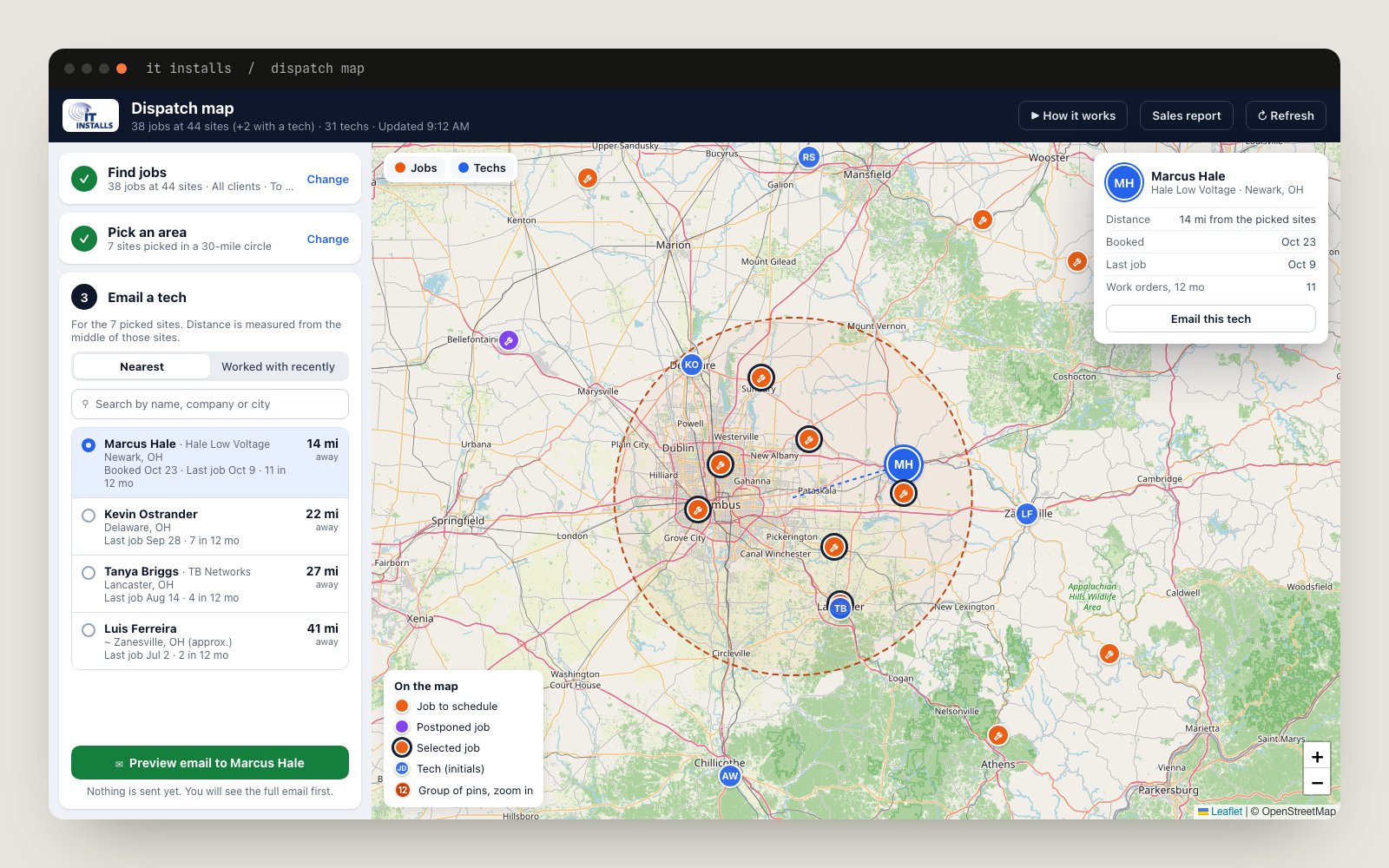
The dispatch map shows every open site as a pin and every tech as a photo or initials. It works as three steps: find jobs (filter by client, status, how long they've been waiting), pick an area on the map, and email a tech. Techs can be sorted by nearest or by who you worked with recently, with their last job and number of work orders in the past year. You see the exact email before anything is sent, and each tech gets their own email (“we have 6 open jobs in your area”) from the work orders mailbox. The map sits inside their Airtable interface, and every staff member signs in with their own account.
4. Quotes and purchase orders
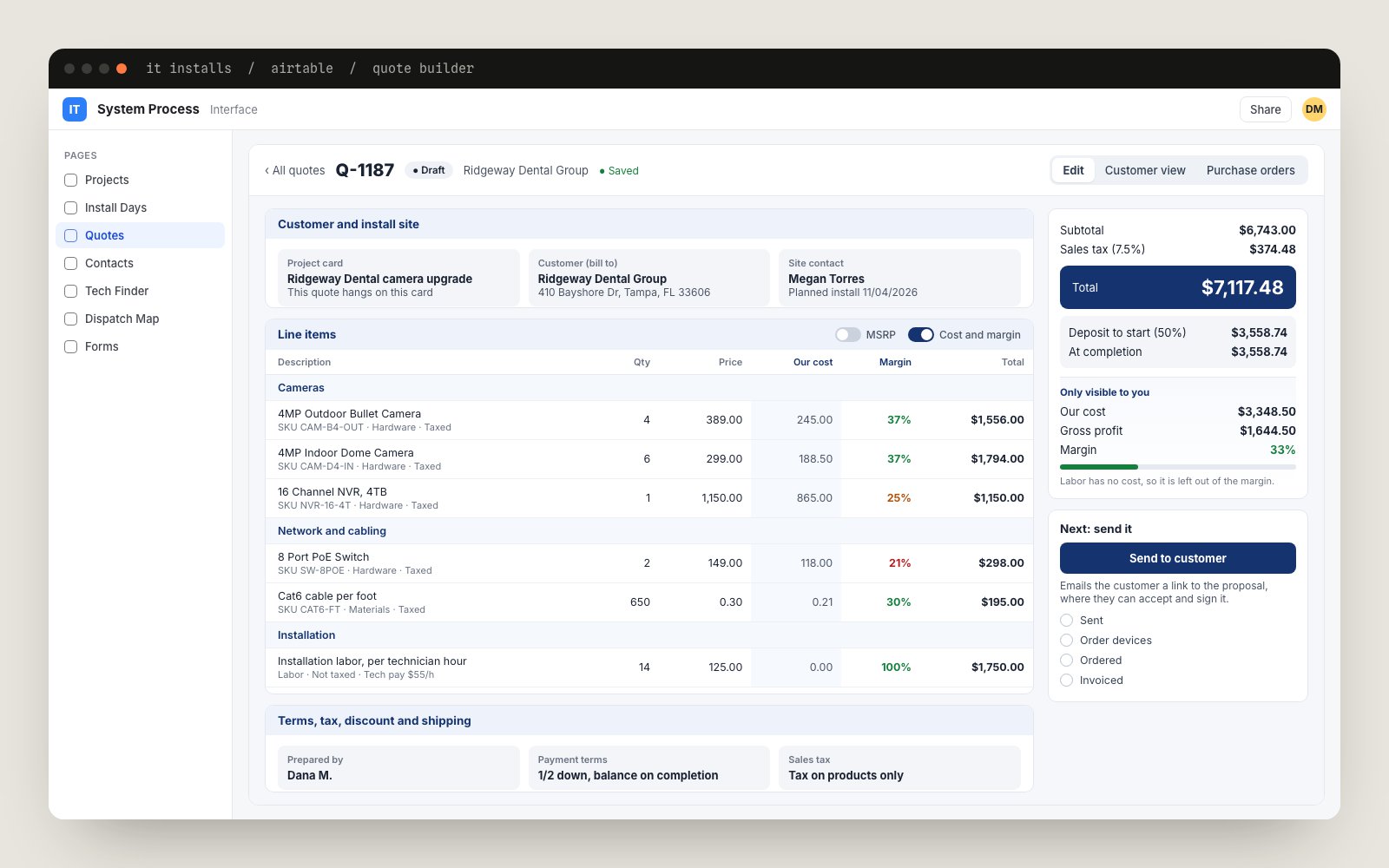
Estimates in QuickBooks frustrated the team. So the quote builder lives inside Airtable, on the project card: products from QuickBooks, cost and margin per line visible only to the office, tax and payment terms, and a branded proposal page where the client accepts and signs online. Purchase orders per vendor are created in QuickBooks and emailed to the supplier from the same screen.
5. Invoicing into QuickBooks
Recurring work for their bigger accounts is invoiced automatically: Make and Apps Script turn spreadsheets and Airtable records into QuickBooks estimates and invoices, with the right numbering and products. The product list from QuickBooks syncs back into Airtable every week, so quotes and work orders always use the same items.
6. Office tools inside Airtable
Small things that make the daily work lighter. A contacts editor where the office finds anyone (employee, active tech, client, site contact) and edits the person and their company in one place. A calendar with one entry per install day. And a cleanup that merged hundreds of duplicate contacts, so the tech network is one clean list.
How tech data is handled
Location only on a tap. The app records one pin at check-in, break and check-out. Nothing in between, and nothing off the clock.
Techs see their own data. Each tech sees their own jobs, pins and pay, and never gets access to the Airtable base.
Keys stay on the server. The app talks to Airtable through a secure backend, so the Airtable key never touches a phone.
Personal accounts. Techs sign in with a code sent by email, and every staff member uses their own account on the dispatch map.
Checked before it goes out. Dispatch emails show a preview before anything is sent.
Inside the build
Two sides of the same system: the app technicians use on site, and the Airtable components the office uses to plan, quote and keep contacts clean. All jobs, addresses and names below are fictitious.
Today's jobs on the phone
Techs sign in with an emailed code and see their jobs for today. On site they check in with one tap, tick off the checklist as they go, and see exactly which location pins the app recorded for them.
Time clock, pay and receipts
A daily time clock separate from the job sites, a pay period view with regular hours and overtime, and receipts with a photo for materials they paid themselves. With no signal, every tap waits on the phone and is sent as soon as there's a connection.
Dispatch on a map
Every open job and every tech on one map, inside their Airtable. Pick an area, see the nearest techs with their last job and how often you worked with them, and preview the email before anything goes out.
Quotes with margin per line
The quote builder lives on the project card in Airtable. Products come from QuickBooks, cost and margin are visible only to the office, and one button sends the client a proposal to accept and sign online.
One place for every contact
A custom Airtable extension where the office finds any employee, tech or client and edits the person and their company in one go. For techs it shows insurance, travel range, skills and payment method right next to the contact.
The result
2,300+ technician work orders run through the system, across 3,700+ site installs (Airtable, October 2026)
One app for the techs: check-ins, time clock, pay periods and receipts on their phone, also without signal
The office plans from a map instead of a spreadsheet, and emails the right tech in a few clicks, with a preview first
Quotes, signatures and purchase orders in one flow, straight into QuickBooks
No per-user licences: custom code on top of the Airtable they already had
In progress: a request portal for their largest client (backtested on 184 past requests) and a sales and profit report per project manager
What else you can build for a field-service company
The pattern works for anyone who sends people to sites: installers, maintenance, cleaning, inspections, security, solar.
A crew app instead of WhatsApp and paper: check-ins with location, checklists, hours, receipts, offline first.
Dispatch on a map: open jobs and people side by side, nearest or most trusted first, one click to invite.
Quotes that become work: a signed proposal turns into a project, purchase orders and a work order without retyping.
Your bookkeeping in the loop: QuickBooks, Exact, Twinfield, Moneybird or Xero for invoices, products and costs.
Client transparency: status, check-in times and completion reports per site, so clients stop asking “what’s going on with…”.
Can you build a technician app on top of Airtable?
Yes. Airtable stays the source of truth for jobs and work orders, and a small web app on the tech's phone reads and writes to it through a secure backend. Techs never get access to the base itself, and the Airtable key never touches the phone.
Why not buy field service software?
Most field service tools charge per user and expect you to work their way. IT Installs has a large network of freelance techs and a process that already worked in Airtable. Building on what they had was cheaper and kept the office in tools they knew.
Does the app work without mobile signal?
Yes. Every tap is saved on the phone first and sent as soon as there's a connection, with a clear “waiting to send” bar so the tech knows nothing got lost.
Is a technician tracked all day?
No. The app records one location pin when the tech checks in, starts a break, comes back or checks out. Nothing in between, and nothing off the clock. The tech can see their own pins in the app.
Can it connect to QuickBooks?
Yes. Quotes, purchase orders and recurring invoices go into QuickBooks Online, and the product list syncs back into Airtable every week.